The product

One HR platform: a free core, every module included

Capstan is one product, not a core with a shelf of paid extras. The free core runs your whole HRIS for up to twenty active employees, and when you grow, a single paid plan turns on the entire platform, all fourteen modules, at one per-seat price. No add-ons, no per-module purchase, and nothing to switch on a piece at a time.

Jump to the free core, the fourteen modules, or how it connects.

One product. The free core, then the whole platform.

Capstan does not split into a thin free tier and an expensive one that finally does the job. It is one product in two states: a complete free core, and the same core with every module switched on the moment you move to a paid plan.

Free, up to 20 active employees

The complete core

Your whole HRIS: people and org, time off, attendance, onboarding and exits, documents and letters, workflows, self-service and reports. It is not a trial and it does not expire, and someone serving notice or already gone does not use up one of the twenty.

What the core runs

One paid plan, one per-seat price

The whole platform

The identical core, plus all fourteen modules, turned on together the moment you move off Free. You pay a per-seat rate on the employees past the first twenty, with no add-ons and nothing bought module by module. The one price is on the pricing page.

See the one price

The free core

Six places somebody opens, and two that run underneath

The core is the whole HRIS, free for up to twenty active employees and on every plan. HR, a manager and the employee themselves each open part of it; two more are not places you visit but the engine and the log every surface and every module run on. Where the core stops, a plain boundary names the module that picks the work up, because a limit you learn before buying is a feature.

Opened by HR

People & Org

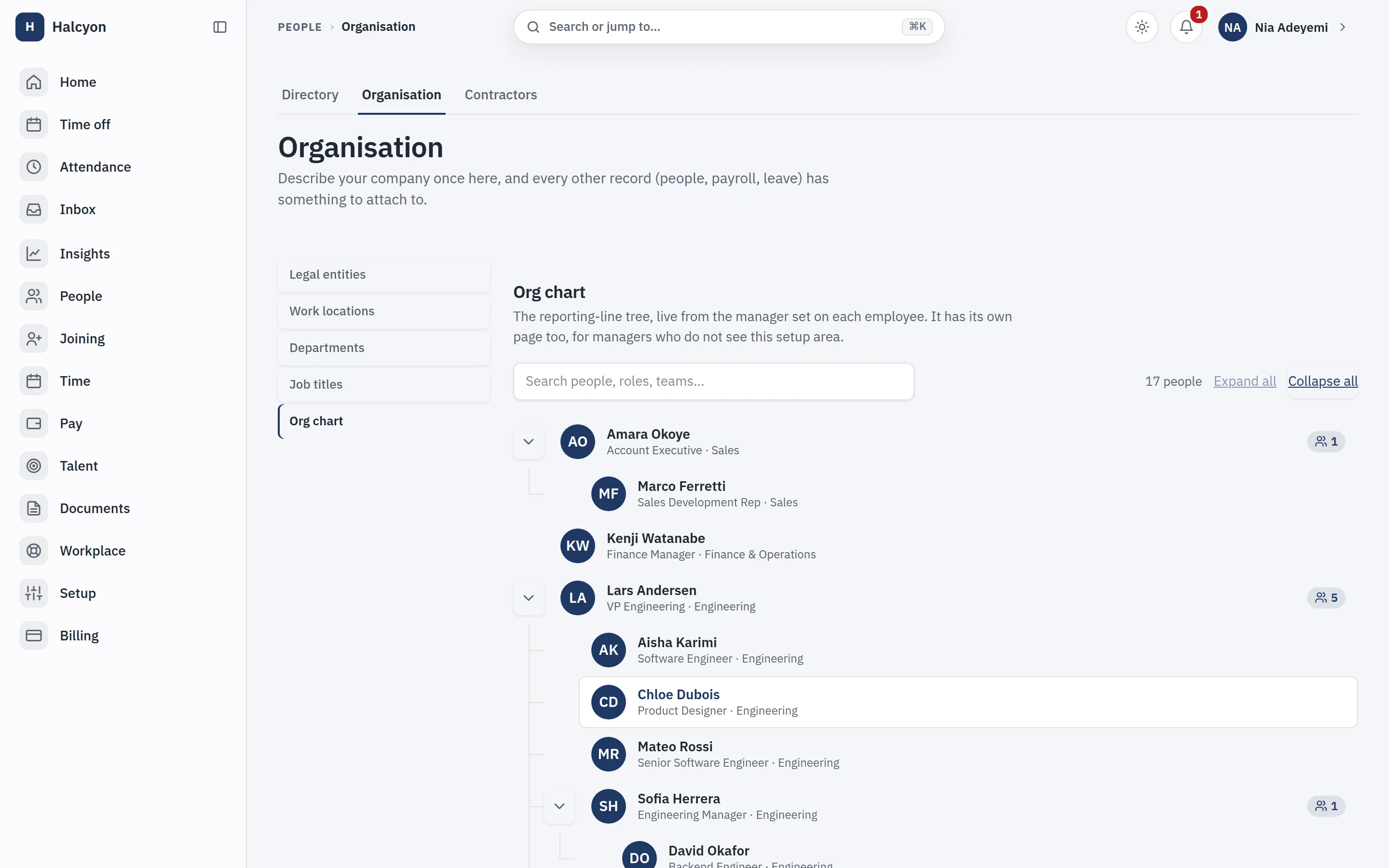
Capstan keeps every employee and contractor in one directory with profiles, custom fields, reporting lines and an org chart that is always current, because it is generated from the records rather than drawn by hand.

  • Employees and contractors in the same directory, org chart and reporting, no parallel spreadsheet for non-employees.
  • Custom fields with types and validation, so "T-shirt size" and "PAN number" are not both free text.
  • Effective-dated changes: promotions and transfers take effect on their date, and history is queryable.
The org chart, generated from the reporting lines on each record rather than drawn by hand

Opened by every employee, and their approver

Time Off

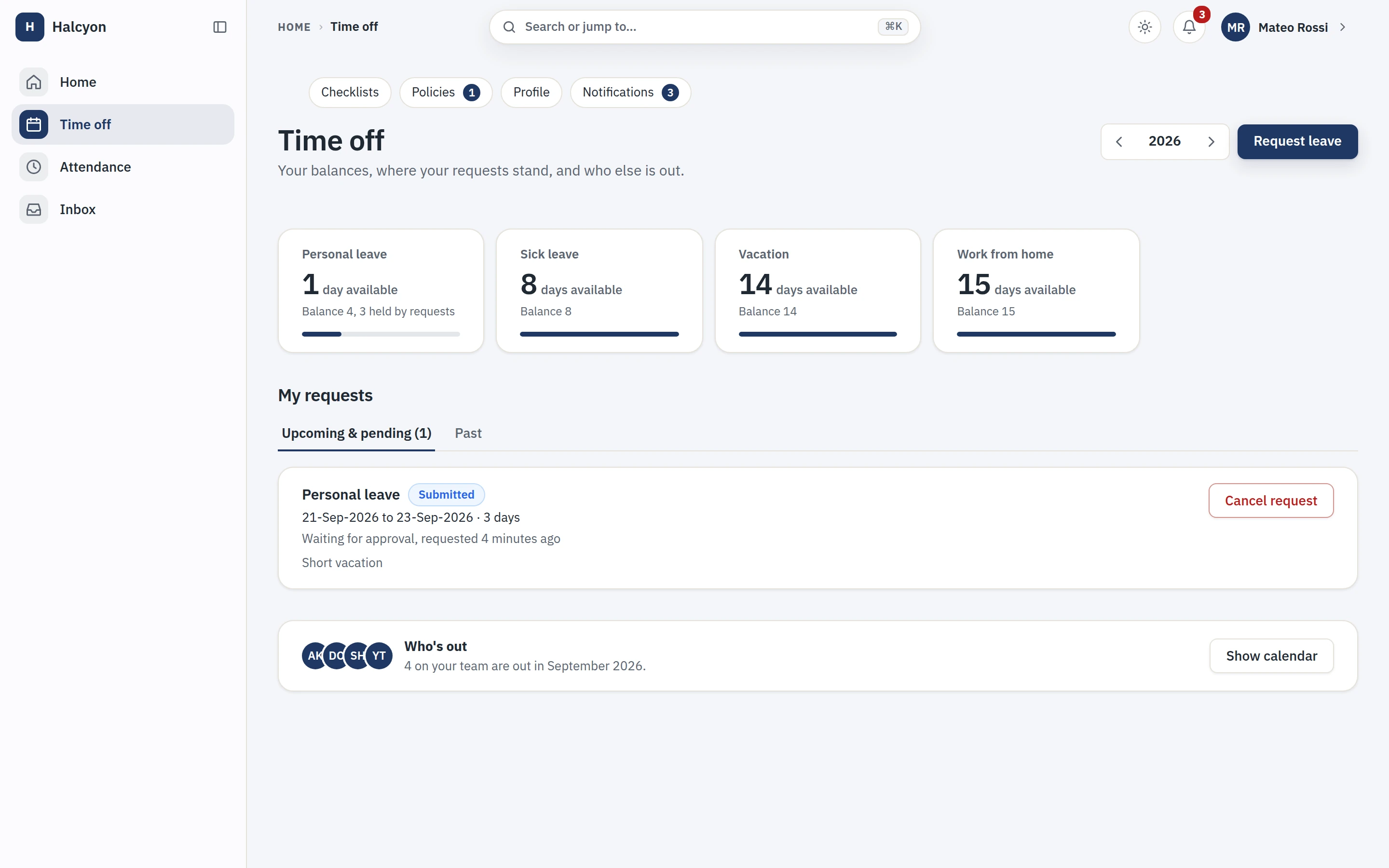
Leave management in Capstan handles multiple policies, regional holiday calendars and approval chains, so a team split across Berlin and Bengaluru accrues and books leave under the right rules automatically.

  • Policy per entity, region or grade: accrual rules, carry-over, negative balances, encashment flags.
  • Holiday calendars per location, applied automatically by each person’s work location.
  • Approvals from the notification itself; balances visible to the employee before they ask.
An employee’s time off: a balance card for each leave type, the requests they have made and where each stands, and who else is out

Opened by HR, and each task owner

Onboarding & Exits

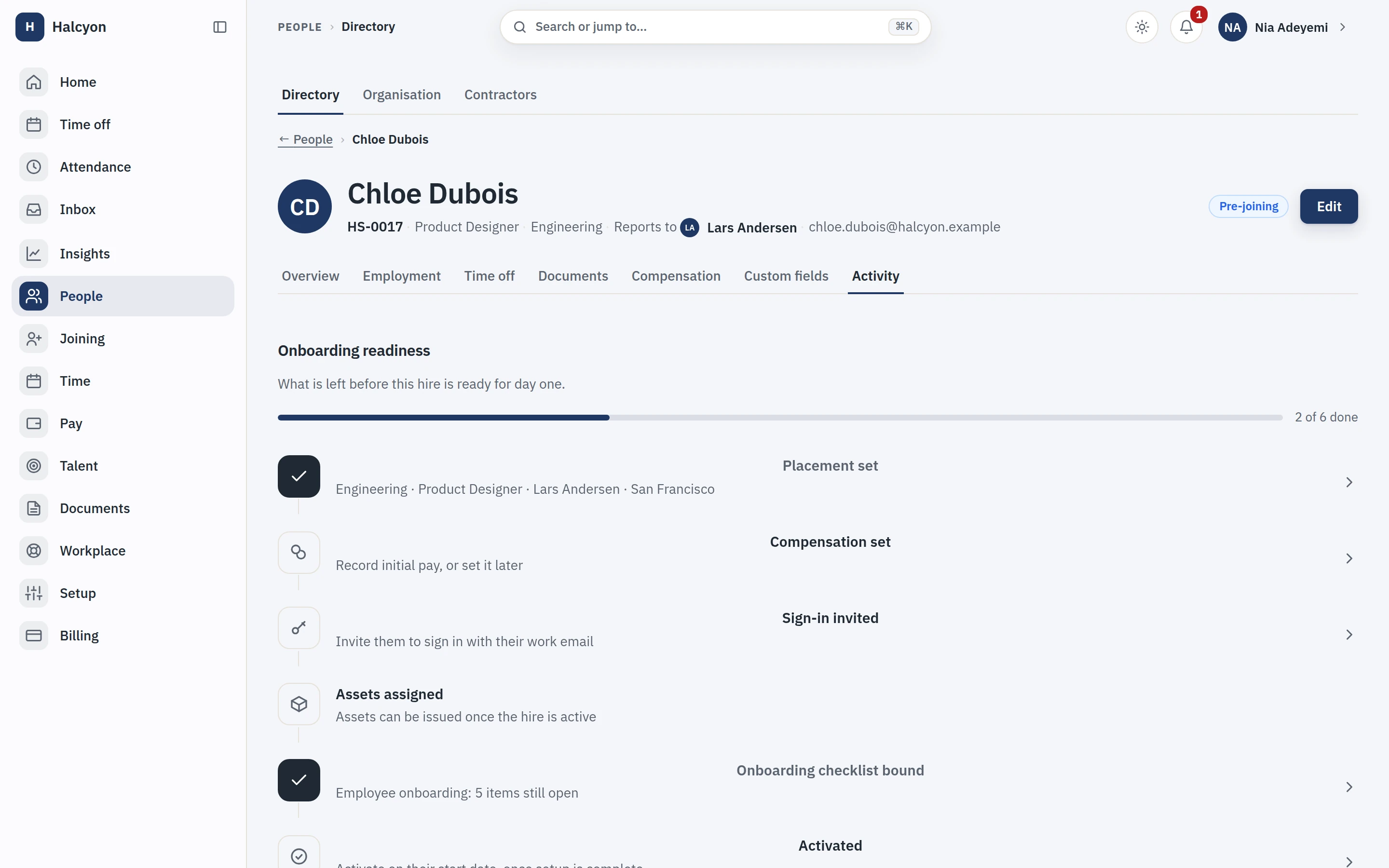
Onboarding and exit checklists in Capstan assign tasks to the right owners with due dates tied to the start or exit date, so a new joiner’s first day is prepared before it happens rather than reconstructed after.

  • Checklist templates per role or entity; tasks assign themselves when a start date is set.
  • Document collection with expiry tracking is part of the flow, not a separate chase.
  • Exits enforce the checklist: access, assets and final documents before the record closes.
Onboarding readiness for a real pre-joiner, tracking what is left before day one against a live checklist

Opened by every employee, and their manager

Attendance

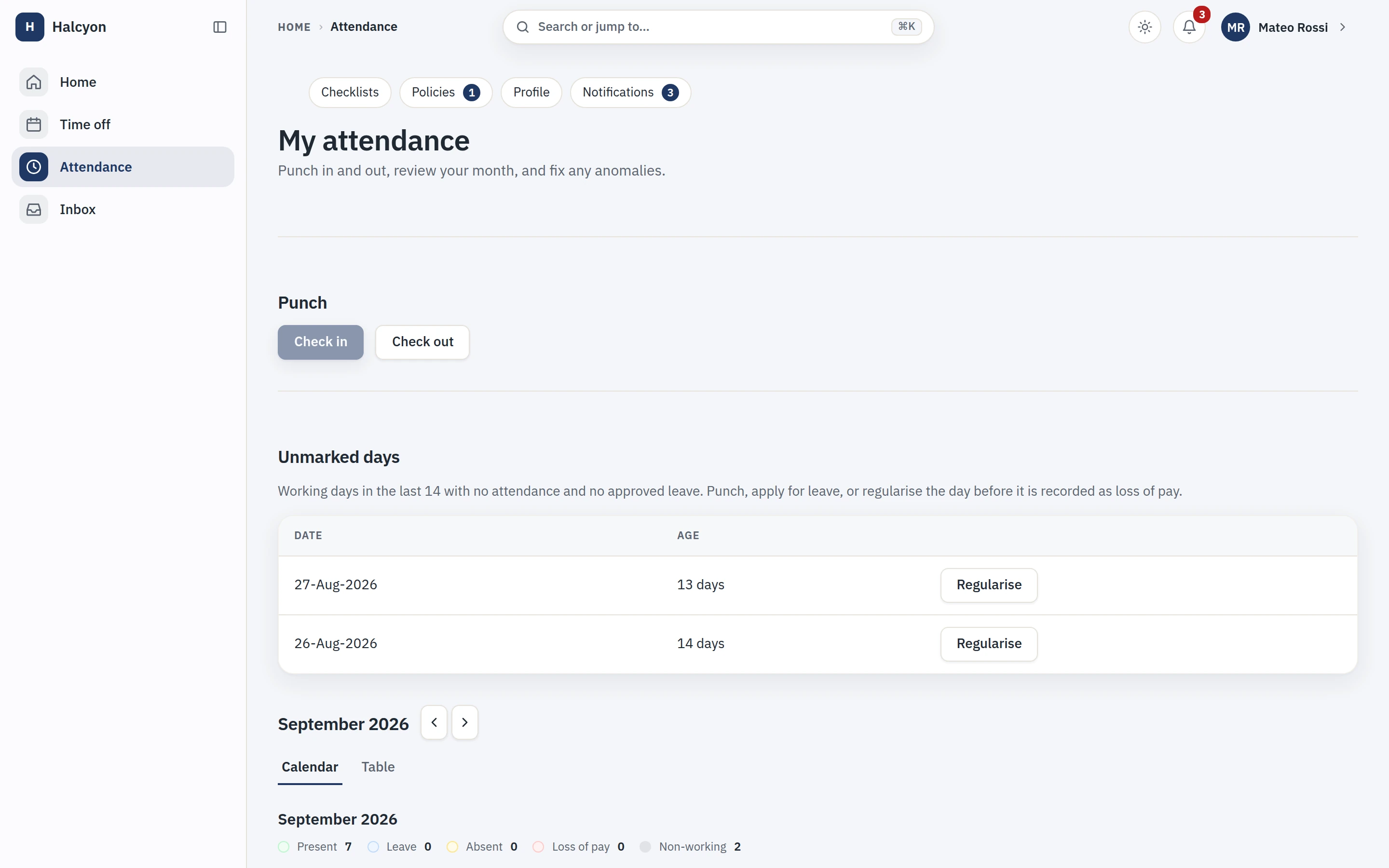
Core attendance is a two-tap punch with timesheets and approvals, built for desk-based teams that need presence records without biometric terminals.

  • Punch in two taps, from web or phone; corrections go through an approval, not an admin ticket.
  • A punch taken with no network queues on the device and replays in order when you are back, so a bad connection never costs someone their hours. The mechanism is documented in full on the integrations page.
  • Timesheets roll up for approval with exceptions surfaced first.
  • Presence data feeds the leave and payroll modules without export-import.

Where the core stops

Advanced shifts, rosters, rotation and overtime rules are the Time & Attendance (Advanced) module, one of the fourteen the paid plan includes, and hardware terminals are not in v1. Payroll is partner-integration mode: Capstan compiles every payroll input and hands a clean export to your payroll partner, the statutory maths is theirs, the system of record is ours.

A month of attendance: the punch, unmarked days to fix, and a calendar marking present, on leave, absent and loss-of-pay days

Opened by HR

Documents & Letters

Capstan stores people documents with expiry tracking and generates letters, offers, addresses, experience, from templates filled with record data, signed and filed against the person automatically.

  • Templates with merge fields from the actual record; no copy-paste-rename rituals.
  • Expiry tracking with reminders for visas, certifications and IDs.
  • Every generated letter files itself on the profile with an audit trail.
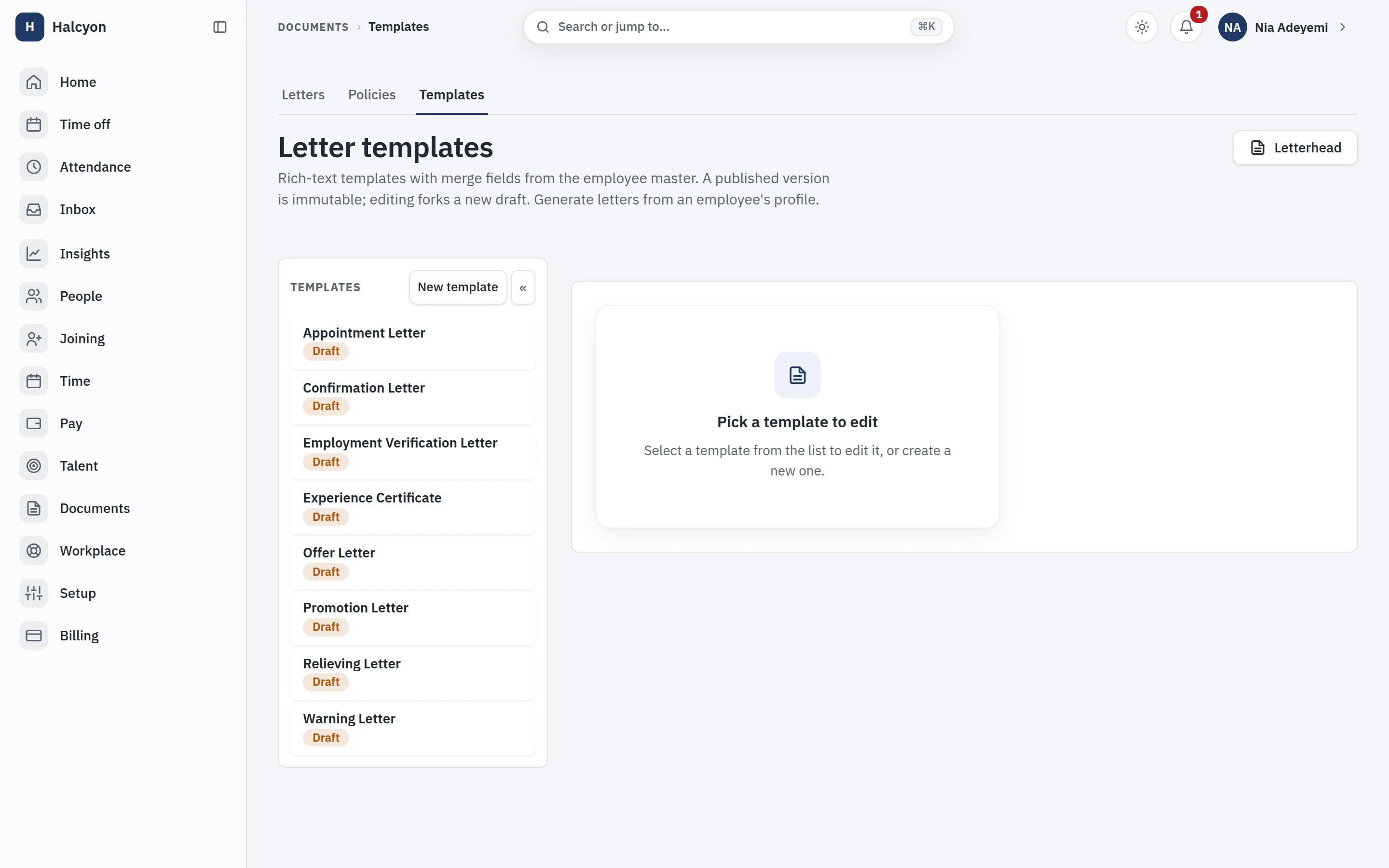
The letter-template library, offer, appointment, verification and more, each built from merge fields that read the employee record

Opened by every employee, without asking HR

Self-Service

Employees see and manage their own record, profile, leave, documents, requests, from web and mobile, which removes the majority of routine HR tickets by making the answer visible.

  • Profile edits route through approval where you configure it, straight through where you don’t.
  • Leave balances, holiday calendar and payslip access without asking anyone.
  • The app is included on every plan; charging for it is the old world’s trick. It is a progressive web app, so it installs to a phone home screen straight from the browser, needs no app store, and updates when the product does with no store review queue in between.
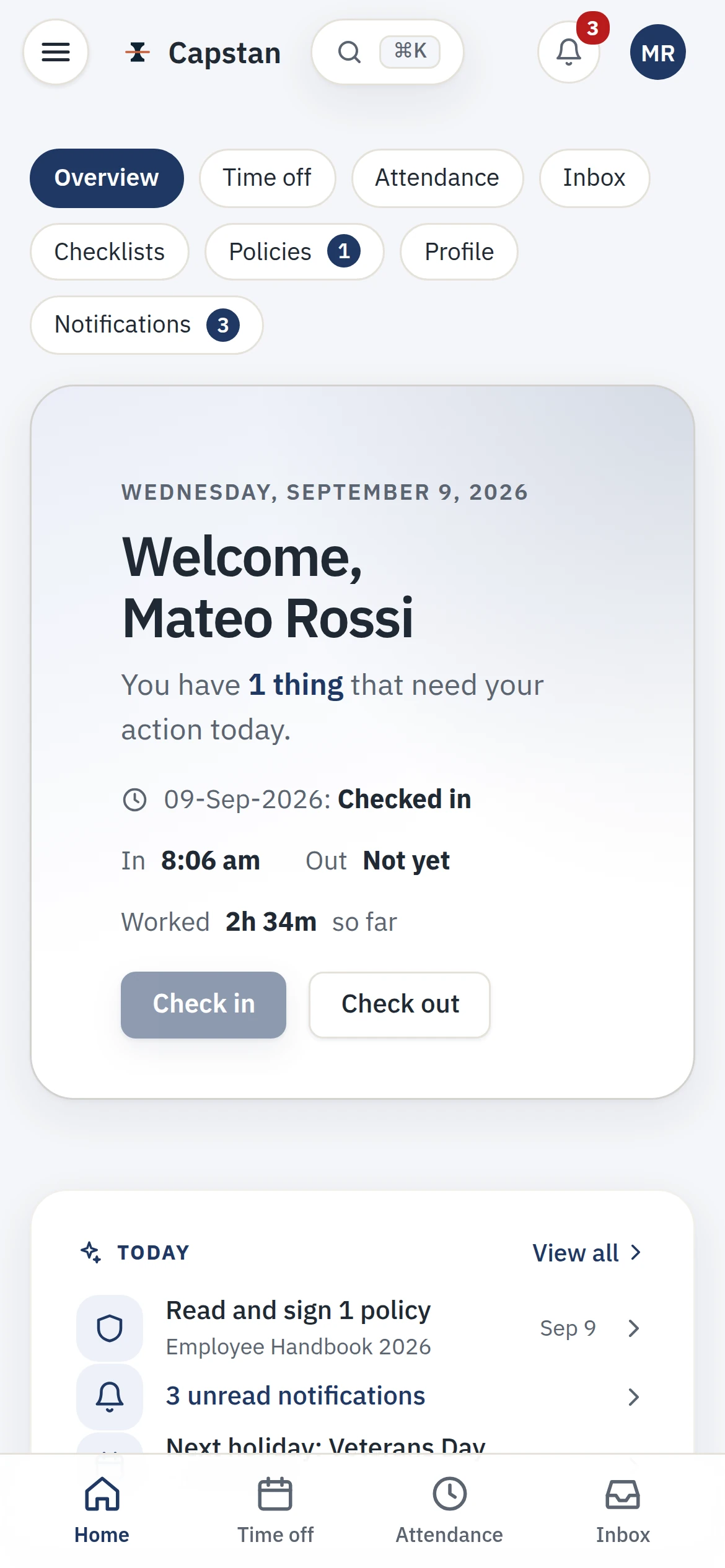
The employee app on a phone: a welcome, the checked-in state with hours worked so far, and today’s tasks

Under every surface

Workflows

The workflow engine routes any request, data changes, letters, custom approvals, through configurable chains with delegation and escalation, and it is the same engine every module uses.

  • Approval chains by org structure, role or named person, with out-of-office delegation.
  • Escalations fire on elapsed time, not on someone remembering.
  • Every step is audit-logged: who, what, when, from where.
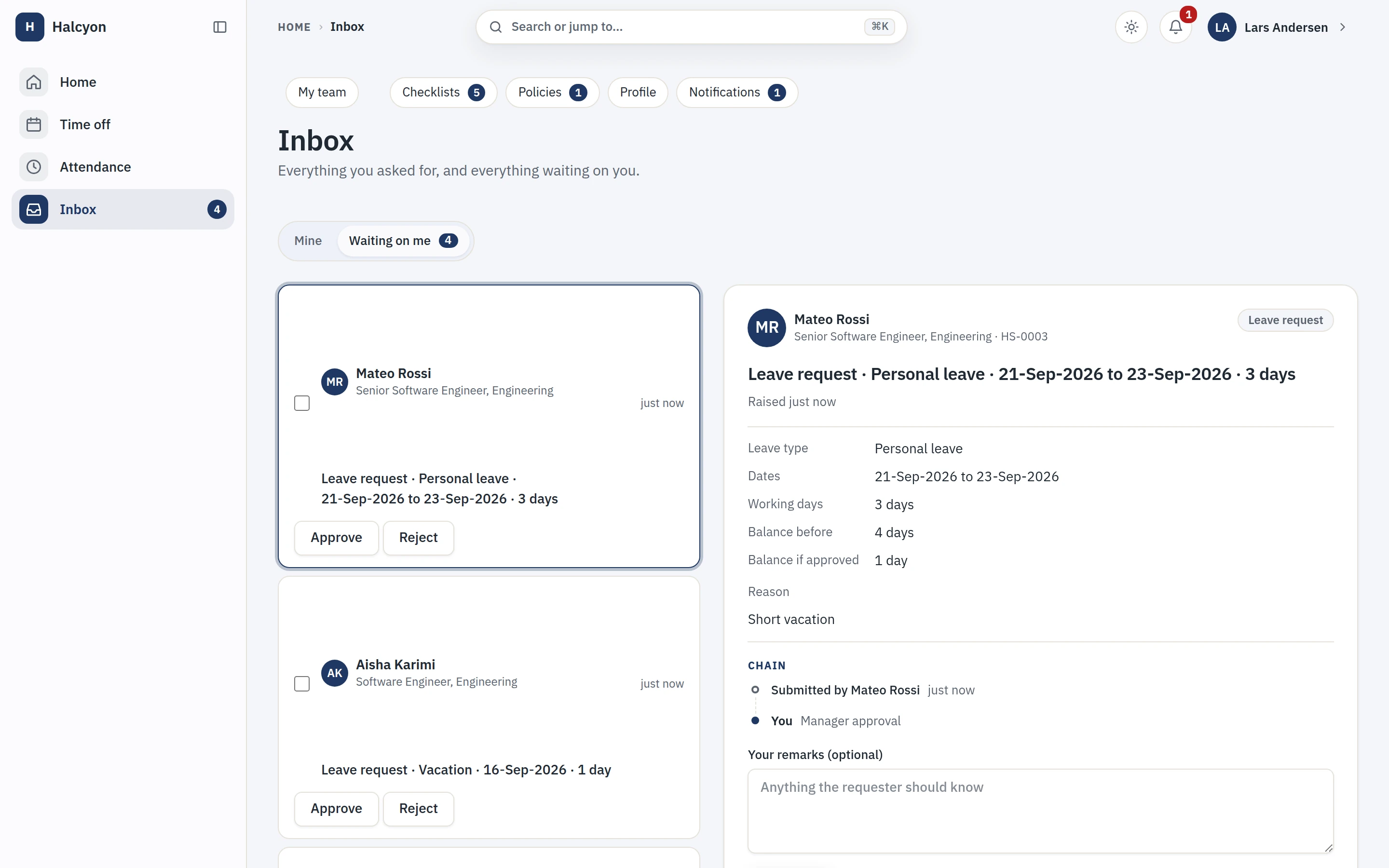
The approvals inbox, showing what is waiting on you and what it is for

Under every surface

Reports & Audit

Core reporting covers headcount, leave, attendance and every list you can filter, exportable in open formats, and every change in the workspace lands in a log with the actor and the timestamp on it.

  • Any filtered list exports as CSV, and scheduled report delivery is on every plan.
  • Standard reports: headcount, joiners/leavers, leave liability, attendance exceptions.
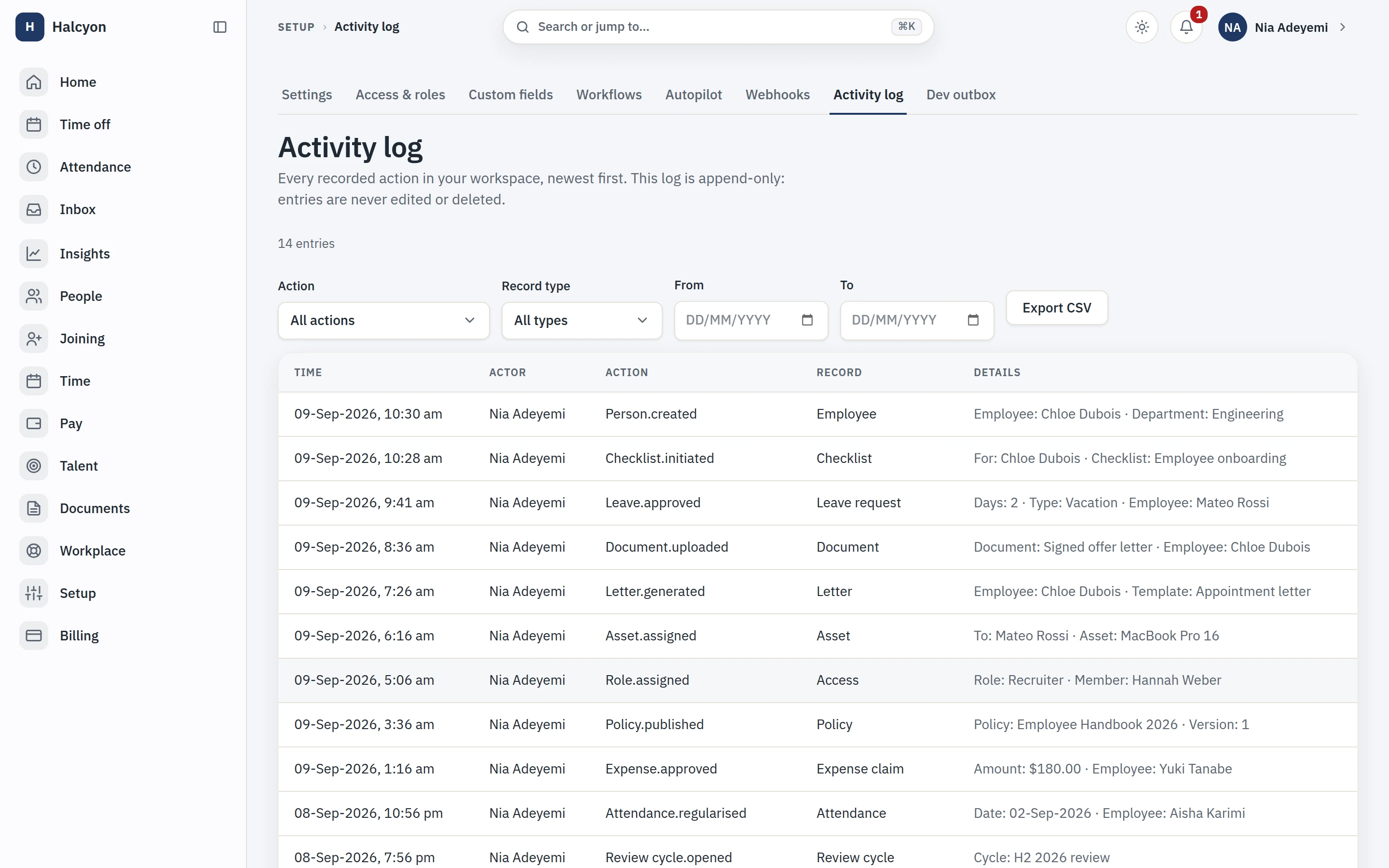
  • Your own audit trail, not only ours: an admin opens the activity log in the product, filters by action, record type or date, and exports it for their own auditor without asking us for anything. It is append-only, updates and deletes are revoked in the database, and it is on every plan, because an audit trail you have to buy is not an audit trail.
  • Every database function in the product is checked against what the test suites actually execute, and one that nothing calls fails the build by name.

Where the core stops

Cohort analytics, trends and a custom report builder are the Advanced Analytics module, included in the paid plan alongside the other thirteen.

The tenant activity log, append only, filterable and exportable by an admin

Included in the paid plan

All fourteen modules, on the day you pay

The core is complete on its own. The modules add the depth a larger org grows into: shift rosters and overtime, statutory payroll compiled for your partner, contractor invoicing, compensation bands and equity your people can see, reviews and surveys, cohort analytics, alumni access, and more. Every one is included in a paid plan at no extra charge, turned on together rather than bought a piece at a time.

Before someone is an employee

Hiring, and the hand-off into the record. One module, because there is one job here and we have not invented a second.

What people are paid, and what work costs

Contractors, equity, pay and reimbursements. Every module in this group records money and none of them moves it: no payout rail, no bank file, no funds resting anywhere in Capstan.

When people worked, and what they hold

Shifts and rosters, time against projects, and the laptop someone is carrying. Operational records, kept where the people records already are.

How people are doing

Reviews, training and surveys. Performance and Engagement publish the same boundary in their own words: no AI forms a judgment about a person, anywhere in Capstan.

Running the HR function itself

For the team that runs HR rather than for everyone in the company: a case queue instead of a shared inbox, and reporting that runs as the person reading it.

After someone leaves

A former employee still needs their own documents. Their access to them does not depend on anyone still working here.

See the full catalogue, and what each module refuses to do

Connect it up

Signed webhooks and a clean payroll export, in the core

Capstan is the system of record, and a system of record has to meet the rest of your stack. Outbound webhooks are a core developer feature on every plan, including the free one, signed and retried and logged, and Capstan compiles a partner-neutral payroll export any partner that can read a file can consume. The integrations page describes every edge at the level a developer needs, including the one that is not open yet and the places that emit nothing at all.

Integrations and API, in full
  • Webhooks, core on every plan, signed with the Standard Webhooks scheme and retried with a per-attempt log.
  • Payroll export, partner-neutral CSV and JSON on a versioned schema, with the partner’s results filed back.
  • Country packs, contractor tax content your workspace configures per jurisdiction.
  • No public API keys yet, and the integrations page says so plainly rather than implying otherwise.

Questions about the product, answered completely

Is Capstan one product or a core with paid add-ons?

One product. The free core is the complete HRIS for up to 20 active employees, and a single paid plan turns on the entire platform, all fourteen modules, at one per-seat price. There are no add-ons, no per-module purchase and nothing to switch on a piece at a time: the whole platform arrives with the plan.

Is the core HRIS really free?

Yes. The complete core HRIS, people and org, time off, attendance, onboarding and exits, documents and letters, workflows, self-service and reports, is free for up to 20 active employees, on every plan including the free one. It is not a trial and it does not expire, and there is no subscription behind it, so nothing there can lapse.

What changes when I move to a paid plan?

Two things: the 20-employee limit goes away, and the whole module suite is switched on. The paid plan, Growth, charges a per-seat rate on the employees past the first twenty, so 21 people is one billable seat rather than twenty-one. Every plan runs the identical core; nothing about the software itself changes.

How many modules are there, and do they cost extra?

There are fourteen modules and all of them are included in a paid plan at no extra charge. Nothing is bought, metered or cancelled module by module: the plan per-seat price is the only charge, and a paid workspace has the whole platform.

Do I have to enable the modules one by one?

No. A paid plan turns on the entire platform at once, all fourteen modules together, the moment the plan is granted. There is no per-module enablement step and no add-on to buy. The only line that separates workspaces is the free core against the full paid platform, plus the 20-active-employee cap on the free plan.

Does Capstan run payroll?

No. Capstan is partner-integration mode: it compiles every payroll input it already holds, attendance, leave, overtime, compensation, expenses and prorations, into a documented export for your payroll partner, and files the partner’s computed results back into the record. It holds no statutory rate, slab or formula and computes no gross-to-net anywhere.

Where does my data live?

In one self-contained region, the EU today: data and object storage in Frankfurt (eu-central-1) and compute in Amsterdam (eu-west-1). Each region is an isolated deployment with no cross-region service key, and there is no region chooser; the same stack is built to open in more regions as they come online. A full export in open formats is always available, including on non-payment and on the way out.

Is there an AI that scores or screens people?

No. No AI evaluates people anywhere in Capstan: no attrition scoring, no sentiment analysis, no algorithmic candidate screening. There is one optional assistant a workspace can turn on, and it answers only from aggregate figures a caller could already see, such as headcount by department, sent to OpenAI which does not train on the data. Nothing scores, ranks or screens a person.

The complete core is free for up to 20 people. The whole platform is one per-seat plan away.